


VTubers are doubling the fun of online gaming, live streaming, podcasting, and more by changing their voices. While VTubers typically interact with fans using animated character avatars, having an anime-like voice is also crucial. Using a voice changer for VTubers allows you to transform your natural voice into an anime character's voice, or even into other tones and languages, making your content more engaging. If you're a VTuber and looking for a voice changer, this article has the answer. Here are five of the best voice changers to help you realize your dreams.
What voice changer do VTubers use on their PCs?
TopMediai – The ultimate VTuber voice changer software
TopMediai Voice Changer This tool is the perfect tool for VTubers to enhance their streaming experience. It allows for real-time voice alteration, offering a variety of effects including high-pitched, robotic, and character voices. Its intuitive interface, high-quality audio output, and compatibility with various platforms make it an ideal choice for VTubers.
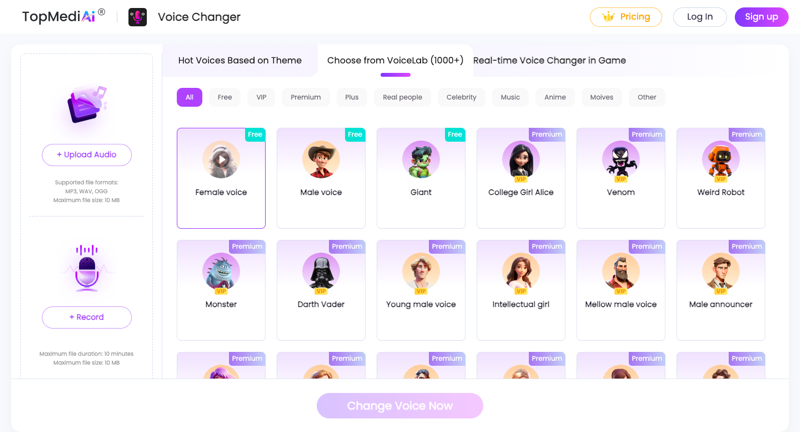
Strong Points:
- Generates the most realistic and natural voice
- Equipped with a background noise reduction function.
- Supports popular platforms such as Zoom, Discord, Skype, and Twitch.
- You can adjust the pitch, tone, and speed of the voice.
- Features a wide range of voice effects and filters.
Disadvantages:
- A subscription is required for full functionality.
- Not compatible with mobile devices
Supported OS:
- Windows
- MacOS
How to use:
Step 1:
Go to the TopMediai official website and download and install the program on your PC.
Step 2:
Once the installation is complete, launch the program and select the device you want to use from "Settings".
Step 3:
Choose your favorite VTuber's voice effect and apply it.

Step 4:
Turn on the "Hear My Voice" and "Enable Voice Changer" toggles, then speak into the microphone. You can then hear the effect applied.
VoiceMod
VoiceMod is a real-time voice changer for Windows. It's a voice tool for VTubers to create realistic voice identities within the metaverse. It's easy to use and has powerful features to transform your voice into that of a character, girl, robot, alien, astronaut, and more.

Strong Points:
- Real-time voice change
- Over 100 types of voice effects
- VoiceLab features allow you to create custom voice filters.
- Perfect integration with Twitch, TikTok Live Studio, and Omegle.
- It does not affect game performance.
Disadvantages:
- It may not work if the network connection is poor.
Supported OS:
- Windows
- MacOS
Clownfish Voice Changer
Clownfish Voice Changer is a free voice changer for VTubers that supports chat apps such as Discord, Skype, Zoom, and Teams. This tool runs in the background and easily transforms audio from your microphone.

All-in-one video converter
Download videos with one click from YouTube, Facebook, Twitter, Instagram, NicoNico, TikTok, Reddit, Netflix, and other video sites. Lossless music converter compatible with Apple Music, Spotify, YouTube Music, SoundCloud, and more. Try it now!
Strong Points:
- Seamless integration with Team, Zoom, Skype, Twitch, and more.
- Advanced features such as text-to-speech, hotkeys, and auto-adjustment.
- Audio controls can be customized.
- Supports VST plugins
- Can also be used as a background music player.
Disadvantages:
- Updates have stopped.
Supported OS:
- Windows
Voxal Voice Changer
Voxal Voice Changer is another powerful voice changer for VTubers. This software provides the ability to change your voice to a different voice and allows you to create new voices using over 100 different effects.

Strong Points:
- Compatible with many devices and does not take up system space.
- With a simple interface, it's easy for beginners to use.
- Compatible with apps such as Skype, TeamSpeak, and Zoom.
- The dashboard has a hotkey function.
Disadvantages:
- Problems can sometimes occur when creating videos for YouTube.
Supported OS:
- Windows
- MacOS
MorphVOx
MorphVOx is a popular choice among voice changer software for VTubers. While there is a free version called "MorphVOx Junior," the Pro version offers a wider range of sound quality and effects, and is recommended for VTubers. The Pro version provides advanced features such as voice visualization and frequency adjustment.

Strong Points:
- Ultra-quiet background function
- The free version includes basic voice effects.
- It provides voice analysis, stereo microphone support, and voice adjustment functions.
Disadvantages:
- It might be a little difficult for first-time users.
Supported OS:
- Windows
- MacOS
結論
In the world of VTubers, having a distinctive voice is important. By using a voice changer to transform your voice into something unique, you can easily obtain an attractive voice like that of an anime character. Among the tools introduced, TopMediai Voice Changer This voice changer is especially easy for beginners to use and boasts high quality, making it sure to make your VTuber activities even more fun and appealing. Find the voice changer that suits you and take your VTuber life to the next level!





