Voice-altering technology is constantly evolving in today's communication landscape. Especially since the beginning of 2024, innovative voice changers for smartphone calls have been circulating. These allow users to enjoy robotic or animal-like voices, or alter their voice pitch to protect their privacy.
This article introduces how to use voice changers for phone calls and recommends some software. Try out some unusual voices and add a new level of entertainment to your calls.
Part 1: How to use a voice changer on your smartphone
There are many ways to create a voice changer for phone calls on your smartphone, but the basic principle is the same. It can be achieved by installing specific apps or using features built into some smartphone systems. These methods allow you to change your voice, adjust its pitch, or apply special voice effects during a call.
Part 2: Recommended Voice Changer Apps
TopMediai Voice Changer
Voice changers for smartphones are handy tools that can transform phone calls into a more fun and unique experience. With them, you can freely change your voice, from a male voice to a female voice, or even a robot or anime character voice. You can use them to liven up calls with friends, add personality to game commentary or live streams, and even protect your privacy.
This time, we'll introduce a free online voice changer that is particularly easy to use and has a wide range of voice effects. 「 TopMediai Voice Changer 」 Let me introduce you to this tool. This tool allows you to alter your voice in real time or apply filters to recorded audio.
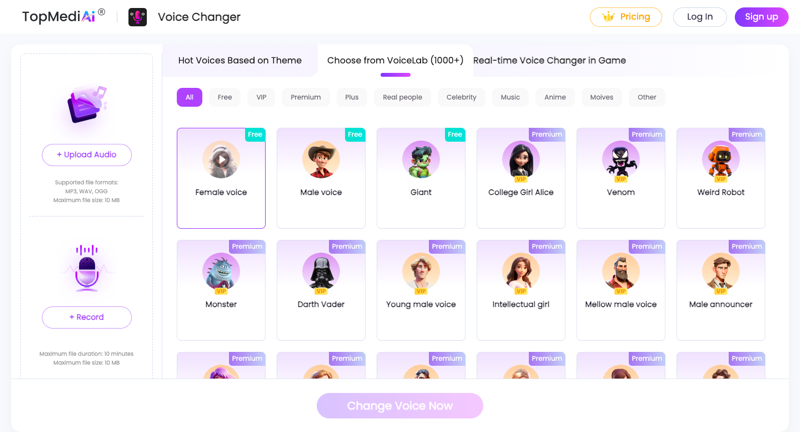
How to use TopMediai Voice Changer (Detailed Guide)
This online tool lets you easily change your voice without installing any special software. Follow the steps below and try it now!
Step 1: Open the TopMediai Voice Changer website.
First, on your smartphone or PC browser... TopMediai Voice Changer Official Website Access it here. No special app installation is required; everything is completed online.
Step 2: Upload your audio.
Once you access the site, click the "Upload Audio" button and select the audio file you want to edit. You can use not only newly recorded audio data but also existing audio files.

Step 3: Select your preferred voice filter
Once you upload your audio, a wide range of filter options will appear. This tool includes Over 1,000 types of sound effects A variety of voices are available, allowing you to transform your voice into various sounds such as robot, fairy, monster, or AI assistant-like voices.
Once you've selected your desired voice filter, click "Change Voice Now." The voice change is now complete, and you can download and use it immediately!
Supports real-time voice conversion!
Furthermore, TopMediai Voice Changer Real-time speech conversion It also includes a feature that allows you to change your voice on the spot during a call, or instantly transform your voice in online games or voice chats. This makes interacting with friends more fun and unique.
Features of TopMediai Voice Changer
This tool is not just a simple voice conversion software. It is multi-functional and suitable for a wide range of applications.
- Text-to-speech function It is also possible to have the entered text read aloud using synthesized speech.
- Advanced AI-powered speech conversion It's not just a simple effect; it enables realistic voice conversion using artificial intelligence.
- Real-time effects : You can instantly change your voice even while on a call.
- Simple and intuitive operation Easy to use even for beginners.
- Over 1,000 sound effects There are plenty of variations, and you can customize them as you like.
TopMediai Voice Changer: Advantages and Disadvantages
Every tool has its pros and cons. Here, we've summarized the advantages and disadvantages of the TopMediai voice changer.
All-in-one video converter
Download videos with one click from YouTube, Facebook, Twitter, Instagram, NicoNico, TikTok, Reddit, Netflix, and other video sites. Lossless music converter compatible with Apple Music, Spotify, YouTube Music, SoundCloud, and more. Try it now!
merit
- Available completely free of charge Basic functions can be enjoyed for free.
- No installation required Because it can be used directly in a web browser, it is compatible with both smartphones and PCs.
- Wide range of sound effects It can be used for both leisure and business purposes.
- Easy to use even for beginners The operation is intuitive and simple.
Disadvantages
- Internet connection is required. : Cannot be used offline. Advanced customization is limited. Some professional features are only available in the paid version.
Voicemod Voice Changer
Voicemod is a highly popular voice-changing software that allows users to freely modify their voice in real time. You can transform your voice into something unique and fun during calls, making conversations with friends and colleagues more entertaining. For example, you can change your voice to sound like a robot, a fairy, or even a demon, or create your own original voice.
The appeal of this software lies in its intuitive and user-friendly interface. The voice changer is easy to use, applying voice effects instantly with just a few clicks. Furthermore, you can fine-tune the parameters to create custom voices, just like a professional sound engineer.
Voicemod is Real-time speech conversion It supports voice changes during calls and live streams without interrupting the call itself. This allows you to freely change your voice while gaming or on calls, enhancing the quality of your conversations.

Main features of Voicemod
- Real-time audio effects It offers a variety of preset voice effects, including robot, elf, demon, and anime character styles. You can instantly change your voice and add a unique element to your calls and games.
- Create custom sound effects In addition to presets, you can fine-tune audio parameters to create your own custom voice effects. This allows you to create even more unique voices.
- Supports various platforms Voicemod is, Discord or VALORANT 、 Skype It integrates with popular voice communication tools such as [list of tools]. Effects can be applied in real time without interruption, even during calls or games.
- Simple operation With its user-friendly interface, anyone can easily perform voice conversion. No complicated settings are required; you can change your voice in just a few clicks.
Voicemod pricing and support system
Voicemod is Free version and Paid version There are two types. The free version offers basic voice conversion functionality, and upgrading to the paid version unlocks even more voice effects and customization options. The paid version is priced annually. Approximately $19.99 is.
Support System Voicemod is mainly Windows System It supports [specific operating systems] and is primarily used in PC environments, but support for other operating systems can be expected in future updates.
VoiceLY Voice Changer
VoiceLY It is a simple yet powerful audio processing software, particularly notable for its voice changer function. Pitch or tone Because it's easy to adjust, even beginners can easily perform voice conversion. VoiceLY's voice modification function is simpler compared to more complex software, but it has an intuitive interface, so anyone can easily select and apply the voice effects they need.

Key features of VoiceLY
- Simple audio effect selection With easy selection of basic sound effects such as tone and timbre, you can change the impression of your voice in a short amount of time. This makes it easy to modify your voice during calls and recordings and add interesting effects.
- Real-time audio effects VoiceLY is real time It offers a feature that allows you to apply voice effects. You can enjoy communicating while changing your voice during a call, which is useful for games, live streaming, video calls, and more.
- Compatible with various voice communication software. VoiceLY works in conjunction with many voice communication tools (such as Skype, Discord, and Zoom). This allows you to apply voice effects in real time while using your favorite applications.
Pricing and support system
- price VoiceLY is, free This is voice processing software available for use on [platform name]. In addition to basic voice modification functions, it is easy to use and offers excellent cost performance.
- Support System VoiceLY is mainly Windows It runs on your system, but because it's lightweight and has all the necessary features, you can use it without worrying about special system requirements.
Part 3: How to improve the usability of voice changer calls
Choose the voice changer that suits you best.
The ideal voice style during a call varies depending on the person you're talking to and the situation. For example, you can enjoy a unique, characterful voice in casual conversations, but a more subdued voice is appropriate for business conversations or private discussions. Therefore, when using a voice changer on your smartphone,
Choosing the right voice for the situation is important.
For example, a robotic or villainous voice might be fun in a game chat, but when talking to your significant other, you'll want to choose a voice that conveys kindness. The greatest appeal of a voice changer is being able to choose a voice that suits your purpose and enjoy it.
Become proficient in using the tools.
Even the best voice changer may take some time to master at first. To fully utilize the tool,
It is important to practice continuously and become proficient in the operation.
Voice changers have many functions and settings, so it's a good idea to start with simple effects and gradually learn more advanced customization. With practice, you'll be able to instantly change your voice during calls and create your own unique voice effects by making fine adjustments. This process will boost your creativity and make it even more enjoyable.
Take on the challenge with perseverance.
When using a voice changer, you may occasionally encounter technical problems or unexpected errors. However, even in such situations...
It is important to respond calmly and without panicking.
When you encounter a problem, you can often solve it by reviewing your settings or trying different settings. It might take a little effort at first, but
By patiently working through problems, you can ultimately achieve a satisfactory result.
Believe in yourself and approach the problem with a positive attitude. You'll often make new discoveries during the problem-solving process, which can lead to even more enjoyable experiences.
結論
Voice changers are more than just unique tools; A very practical and fun feature I have it. Voice changer calls on your smartphone will enhance your daily life. Even more fun It will add a unique touch. For example, whether you're chatting with friends, making game calls, or using it in situations where you want to maintain a little privacy, a voice changer can add a new dimension to any situation. If you choose a voice changer that perfectly suits your needs, Work conversation or A moment of entertainment It will also become richer and more enjoyable.
if, I'm having trouble deciding which one to choose. In such cases, the easy-to-use " TopMediai Voice Changer for Phone Calls Trying out options like these is also a good choice. With this tool, you can start enjoying fun calls right away and fully enjoy the appeal of voice changers in your daily life and work!