When you spend hours creating a Shorts video, you want to grab your audience's attention from the very first glance. A low-quality Shorts video will only provide a mediocre viewing experience. With so many creators striving to gain viewers on YouTube, you need to stand out with eye-catching visual content. A key requirement for achieving the video quality you want is an HD camera for creators. Once you have the right equipment, here's how to consistently upload high-quality Shorts to YouTube.
Improve the quality of your YouTube Shorts by adjusting the video quality settings.
Before adjusting your YouTube Shorts editing workflow, it's crucial to ensure the YouTube app is streaming your video at the highest possible resolution. Incorrect settings can cause YouTube to stream 4K videos at low quality, even if you've uploaded them.
Step 1: From the home screen or app drawer YouTube Launch the app.
Step 2: In the upper right corner of the YouTube app profile Tap it.
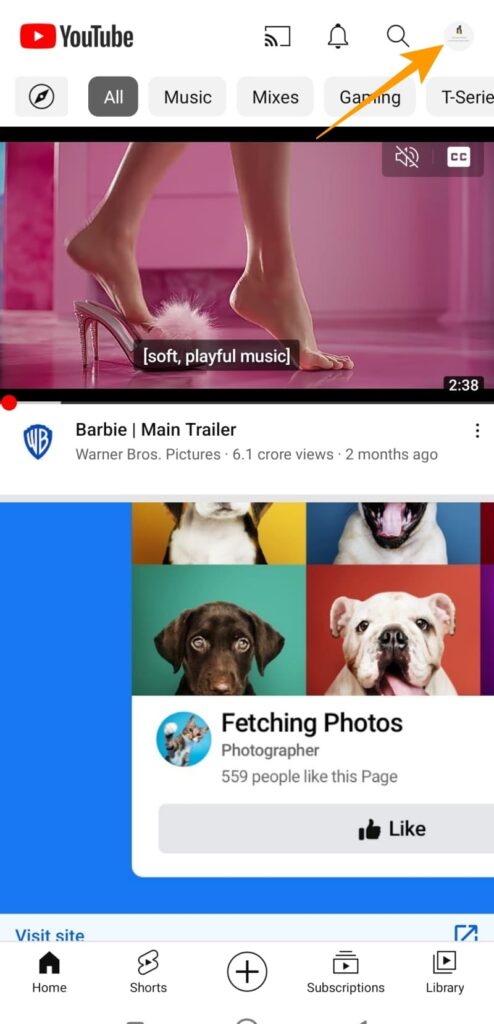
Step 3: List of options [setting] Select one.
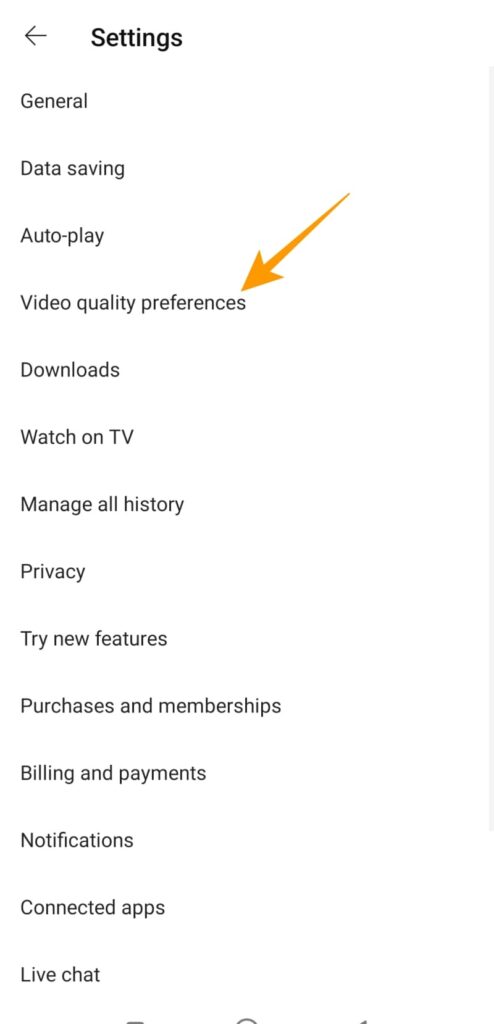
Step 4: In the [Settings] menu, [Video Quality Settings] Tap the option.
Step 5: [Video Quality Settings] in, [Video quality on mobile network and Wi-Fi] Section [High quality] Tap it.
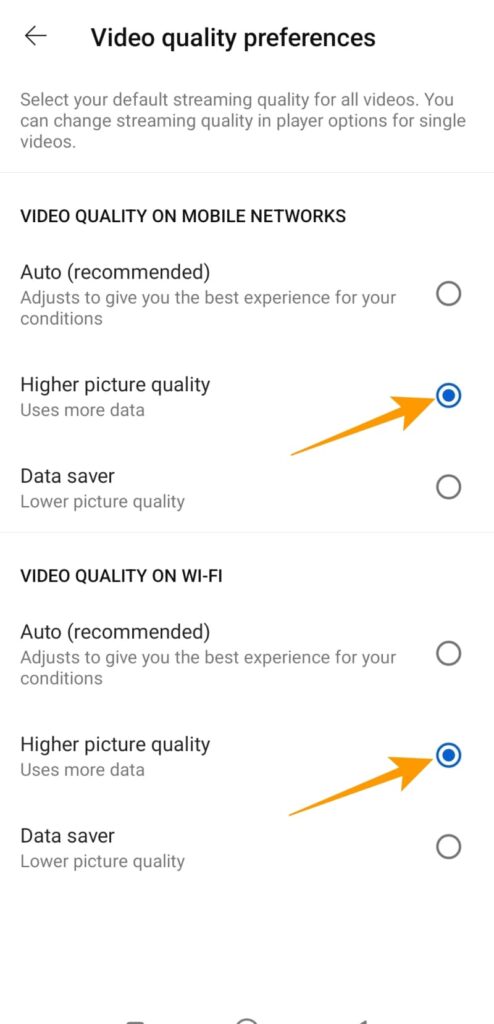
This ensures that the YouTube app always streams videos and Shorts at the highest quality allowed on your connection.
What resolution should I record YouTube Shorts at?
YouTube Shorts require recording in a 9:16 aspect ratio. While the platform only supports 1920 x 1080 resolution for short videos, you can shoot in a higher resolution. Then, downscale the video resolution during editing. This will include more detail in your YouTube Shorts, although this may not be easily noticeable to most users.
Upload high-quality YouTube short videos from your desktop.
If you're editing YouTube Shorts on your desktop, uploading your video to the platform from your desktop is the most convenient option. Ideally, you should render your video in 2K or 4K resolution. Then, follow these steps to upload your high-quality YouTube Shorts from your desktop.
Step 1: Access YouTube using your desktop web browser and log in to your YouTube Creator account.
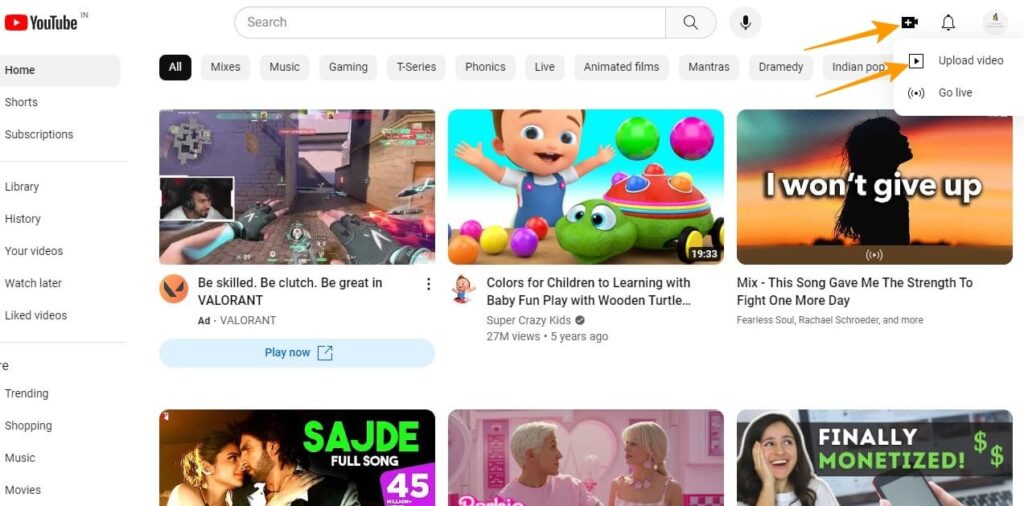
Step 2: Once logged in, click the upload icon in the upper right corner of the browser screen, and from the pop-up menu... "Upload video" Click on the option.
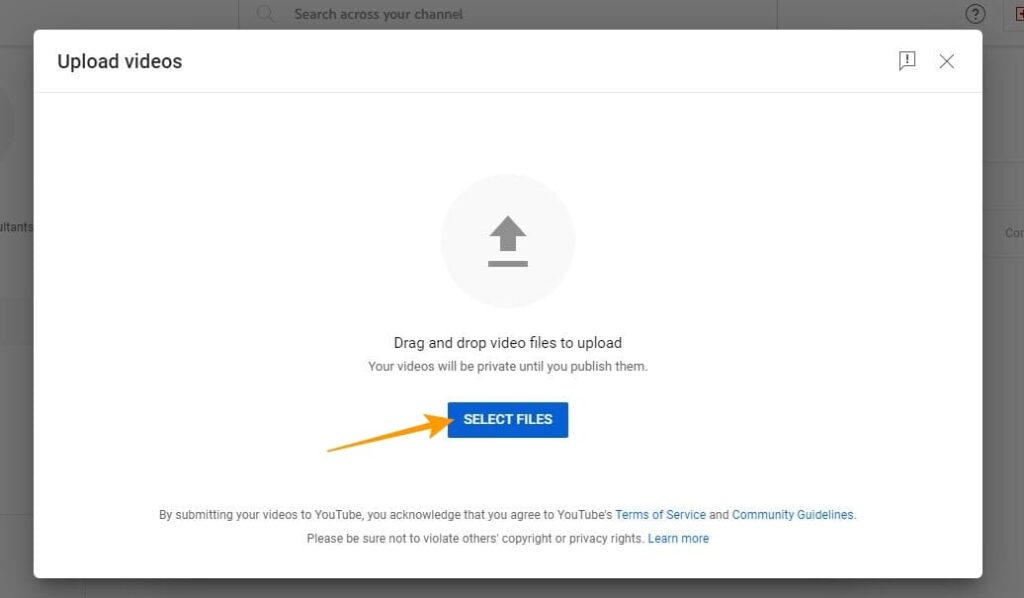
Step 3: "Upload video" On the screen, "Select file" Click to select the video you want to upload. At this point, you need to make sure the video is in HD format, in portrait orientation, and is under 60 seconds long so that it can be used as a YouTube Short.
Step 4: On the next screen, under the details section, the video title and explanation Enter the following: To gain further reach and visibility, add the following to the end of the title and description. #Shorts You can add hashtags.
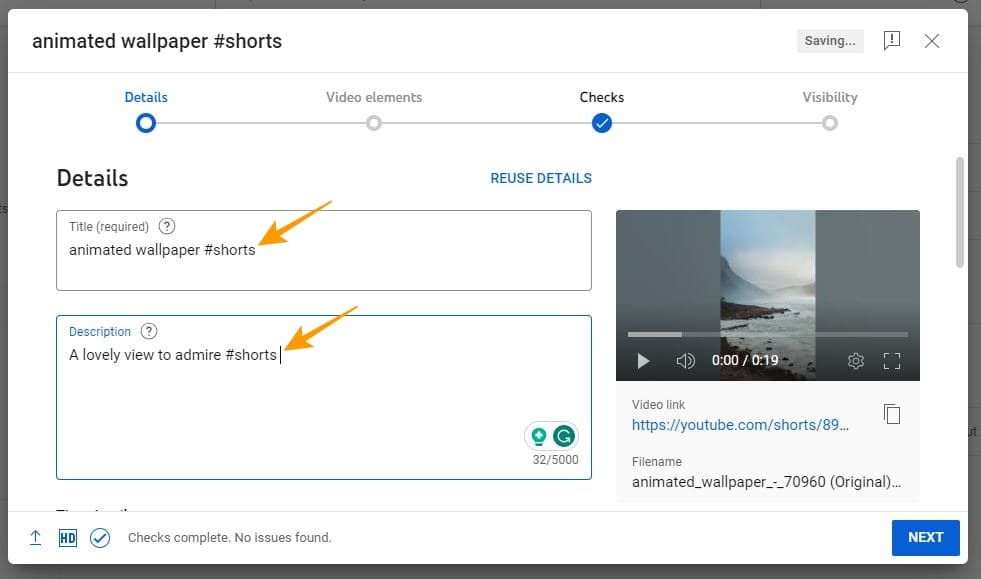
Step 5: Scroll through the screen, select your target audience as needed, and apply age restrictions. At the end of the pop-up screen, you can confirm that the uploaded video is in HD quality.
Step 6: Once completed, click in the bottom right corner. "to the next" Click the button.
Step 7: In the video elements section, add elements as needed, and in the bottom right corner... "to the next" Click the button.
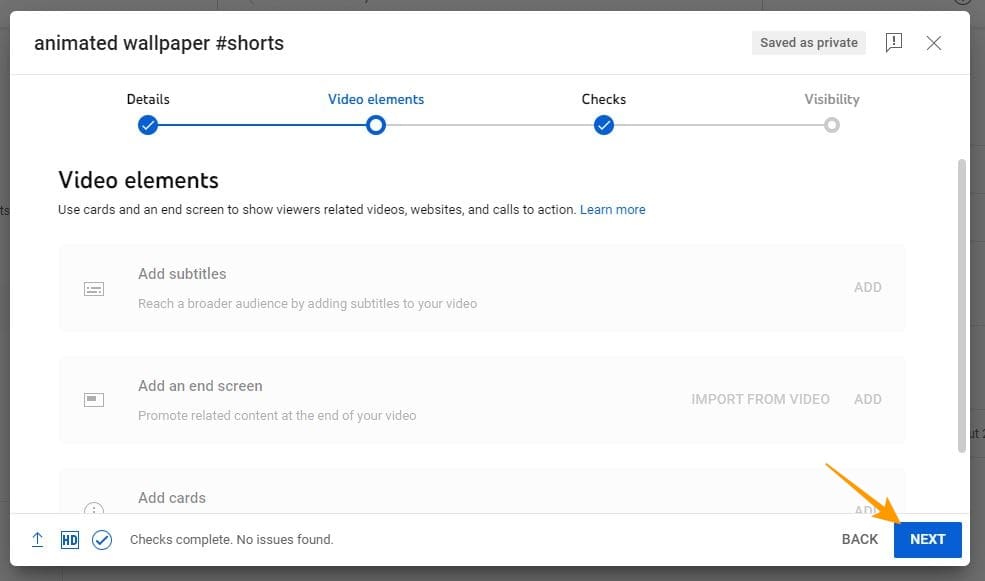
Step 8: The platform checks the video content to scan for copyright issues. If there are no issues, "to the next" Click the button.
Step 9: In the visibility section, the video 「公開」 Set this to make Short visible to everyone on the platform.
Step 10: Finally, in the bottom right 「公開」 Click to publish your YouTube Short.
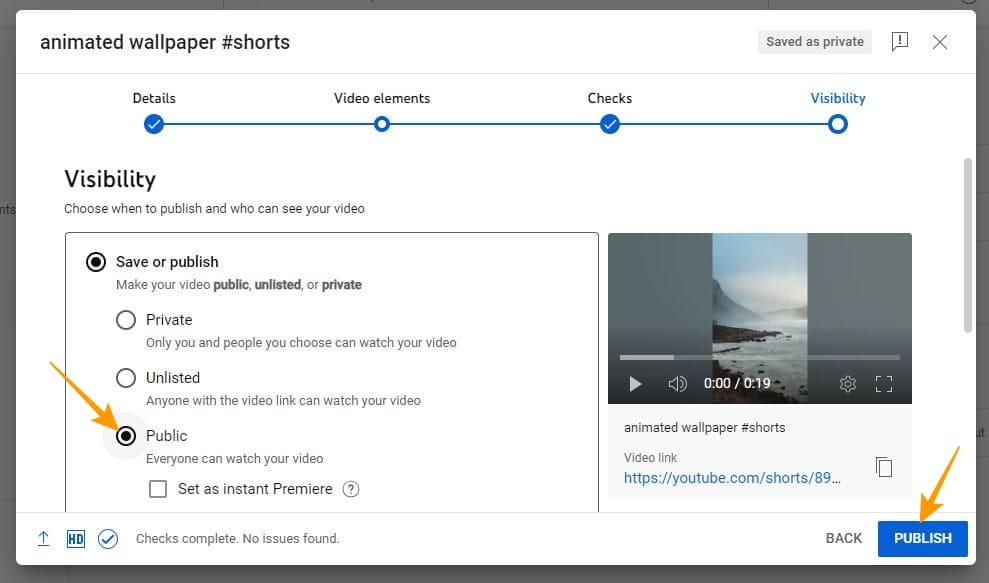
Upload high-quality YouTube Shorts from the YouTube app.
You don't have to be glued to your desktop to upload YouTube Shorts. You can also upload high-quality Short videos using the YouTube mobile app. Here's how:
Step 1: Open the YouTube app on your mobile phone.
Step 2: Tap the (+) icon at the bottom of the app.
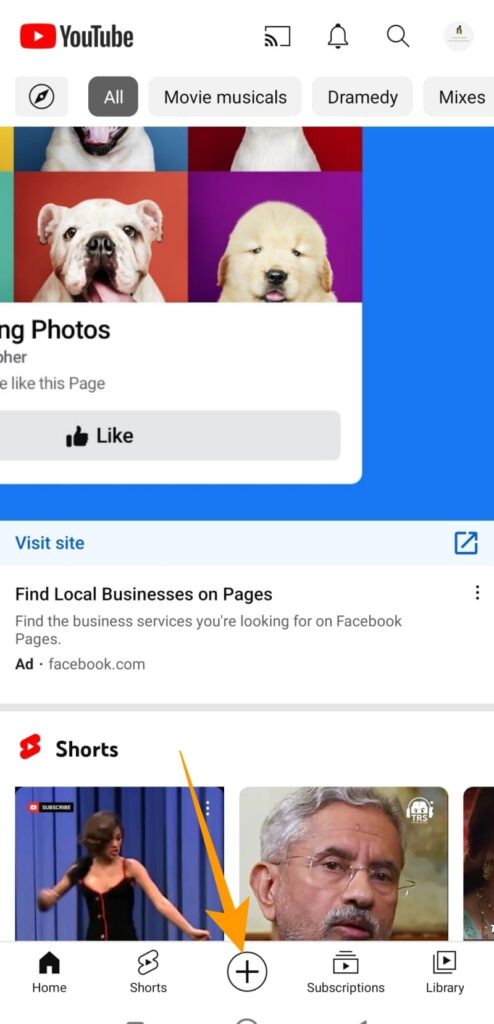
Step 3: "create" From the menu "Uploading a video" Tap the option.
Step 4: Select an HD quality video to upload as a short video. At this point, to be certified as a YouTube Short, you need to make sure the video is in portrait orientation and does not exceed 60 seconds in length.
Step 5: If the uploaded video meets the short length criteria, adjust the length. [Drag to adjust the video] Options will be displayed. Once finished, "to the next" Tap it.
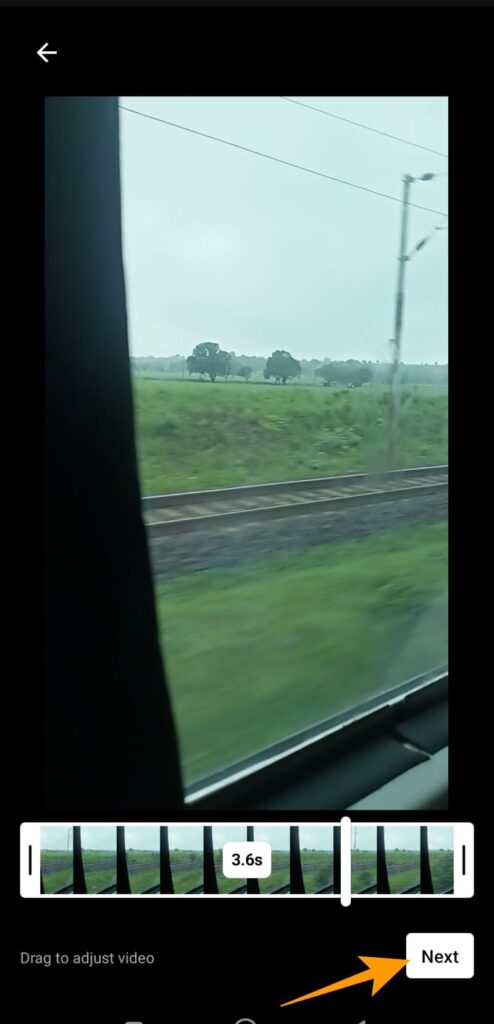
Step 6: On the next screen, you will see options to add sound, text, filters, and a timeline to your short. Then, in the upper right corner... "to the next" Tap it.
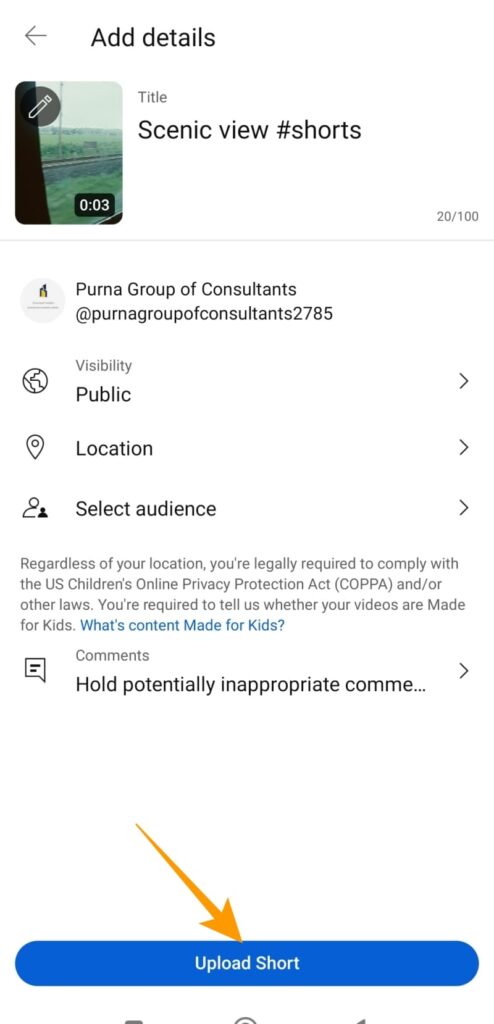
Step 7: [Add details] In the section, title Enter the title of your short story in the field. Also, be sure to add the hashtag #Shorts to the title to increase its reach.
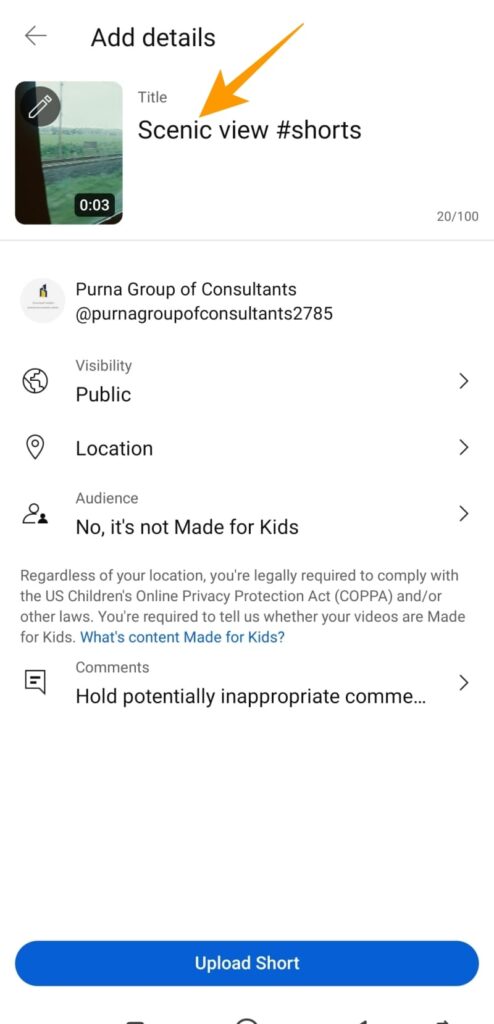
Step 8: On the same screen, [Publication settings] Set it to [Public], [Select viewers] Tap the options to select the appropriate audience group for your short video.
Step 9: [Viewer's Choice] On the screen, if the video is for children, tap the "Yes, it's made for children" option. The same applies if it's not for children.
Step 10: Finally, at the bottom [Upload short] Tap to upload your video as a high-quality YouTube Short.
Always upload high-quality YouTube Shorts.
Like other popular social media platforms, YouTube has evolved significantly over the past decade. YouTube Shorts is one notable example of this evolution. As YouTube continues to grow as a platform, with increasing numbers of creators and users, the platform is more crowded than ever before.
Therefore, as a creator, it's crucial to provide your audience with the best possible content. Otherwise, YouTube accounts that regularly post low-quality, spammy content may be blocked. Thus, as a creator, you need to invest in creating high-quality shorts to reach a wider audience.
FAQ
Q. How can I improve the quality of my YouTube Shorts?
A. Make sure you're shooting your short videos using a good camera that can record video at least 4K resolution under proper lighting. Also, render your edited videos at the highest resolution possible.
Q. Why are my YouTube Shorts uploaded in low quality?
A. YouTube video settings, video file format, compressed video files, and slow internet connection during upload are some of the common reasons why short videos are uploaded in low quality.
Q. Which YouTube Shorts are of the highest quality?
A. Unlike regular YouTube videos, which can be uploaded in resolutions up to 8K, Shorts videos are limited to an aspect ratio of 9:16 and a resolution of 1920 x 1080.