
Voice notes are expressive and can convey more information than words alone. Everyone enjoys listening to them, right?
In addition to text-based conversations, Instagram now allows users to send voice messages. All you have to do is tap, hold, record, and send.
But what if you're having trouble playing back Instagram voice messages?
The good news is that we have several solutions to help you fix the problem and enjoy this fascinating communication feature. So let's get started without delay.
Why you might not be able to hear audio messages on Instagram and how to fix it.
If you're not hearing audio messages on Instagram, there could be several reasons for the problem. Some common causes of this issue include:
- Microphone access is disabled.
- Old apps
- Instagram server issues
- The cache is corrupted.
Quick response
Restart your device and app, and check the Instagram server status. Additionally, make sure the volume is not muted and that no Bluetooth audio devices are connected to your phone.
Method 1: Troubleshoot your internet connection
An unstable internet connection can interfere with the playback of voice messages. Therefore, it is important to speed up your internet connection to fix the problem.
Method 2: Log back into your account
Log out of your account and log back in. This may fix a temporary minor issue and resolve the error.
Step 1: Instagram [Settings and Privacy] Go to the menu and scroll down [Logout] Tap it.
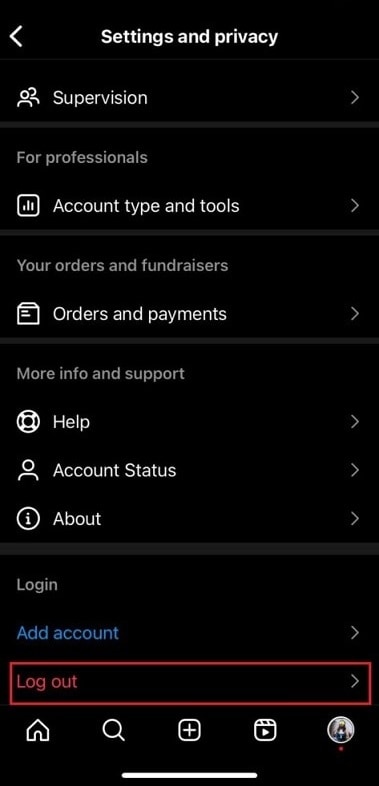
Step 2: [Logout] Tap it again to perform the action confirmation I will.
Step 3: Wait a while, then go to your Instagram account Log in Please check if you can access the voice message.
Method 3: Switch to Instagram Lite or Instagram Web
You might want to consider switching to Instagram Lite. It's a simplified version of the app for Android devices, and it doesn't lack essential features like voice messaging.
However, if you're using an iPhone, you can use Instagram Web to check if the voice message plays there.
Notice: On Instagram Web, you can only play back voice messages you already have; you cannot record and send new voice messages.
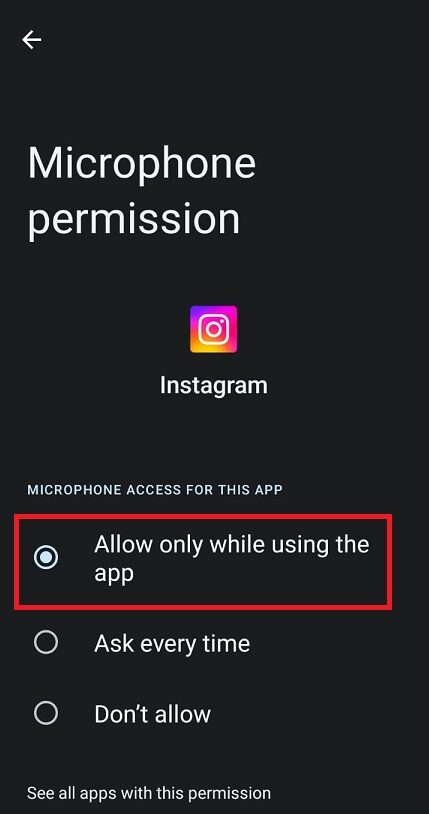
Method 4: Allow Instagram to use your microphone
Make sure Instagram is allowed to access your phone's microphone. Otherwise, the app won't be able to record or play voice messages.
Step 1: Phone setting Open it, [App] Tap then [App Management] Tap it.
Step 2: Instagram Select, [Access permission] Tap it.
Step 3: [microphone] Tap, [Allow only when using the app] Select one.
Method 5: Disable Data Saver Mode
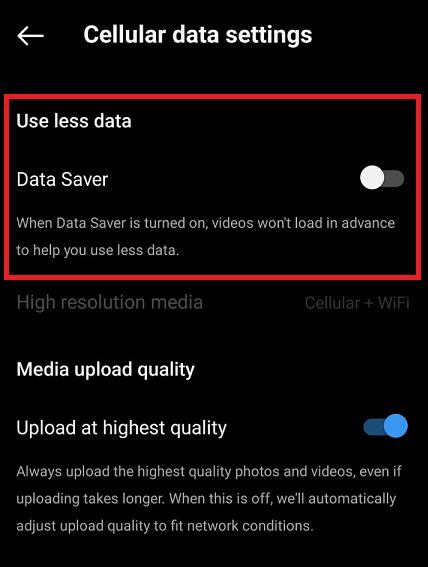
Instagram has a data saver feature to conserve internet data while using the app. However, this can sometimes affect the app's functionality.
Step 1: Instagram [Settings and Privacy] On the menu, [Data usage and media quality] Select one.
Step 2: [Data Saver] Turn off the toggle.
Method 6: Update the app
The issue of Instagram voice messages not playing may be due to an older app version containing bugs or glitches. Please update the app to see if that resolves the problem.
Method 7: Clear your Instagram cache
Corrupted cache data can cause apps to malfunction. It's important to remove it. Refer to our detailed guide on how to clear your Instagram cache and follow the steps to resolve the issue.
Method 8: Contact support
If the problem persists, we recommend reporting it to Instagram through the app for further assistance.
Frequently Asked Questions (FAQ)
Q1. Is there a way to download Instagram voice messages to listen to them offline? 。
Answer: No Instagram does not have a feature to download voice messages. They can only be listened to within the app.
Q2. Do Instagram voice messages expire?
Answer: No, Instagram voice messages do not automatically expire. Once sent, they remain in the conversation. They will not be deleted unless you delete them yourself, or unless the recipient chooses to retract them.
Q3. Can I send voice messages from Instagram using my PC?
Answer: No, You cannot send voice messages from Instagram via PC or the web version. This feature is only accessible through the Instagram mobile app.
Our guide Resolved the issue of Instagram voice messages not playing. I hope this was helpful.
However, if the problem persists, try reinstalling the app on your device.
Continue to check TechCult for troubleshooting guides.