
Have you ever experienced the problem of Instagram Reels insights not showing up? After posting your best Reel, you might be eagerly waiting for your insights, only to find a blank space. But don't worry, fellow Reel creators! There are several steps to troubleshoot and resolve this issue. This guide will explore the causes of Instagram Reels insights not showing up and provide solutions to resolve the problem.
Why am I not seeing insights on Instagram?
There are several reasons why Instagram might not show you Insights:
- Temporary glitches or issues within the Instagram app or platform may prevent Insights from loading correctly.
- Personal account In this case, you may not have access to insights. Insights are generally not available immediately after posting a Reel or other content.
- Poor internet connection, Network problem This can affect the loading of insights.
- If your account settings are configured to restrict access to certain data or insights, this may prevent you from viewing the insights.
- Using an older version of Instagram may affect the availability and functionality of Insights.
Quick response
Try logging back into your Instagram account or check your internet connection. App glitches or temporary network issues can sometimes prevent Insights from loading correctly.
Method 1: Check your account status
If you are involved in activities such as buying followers, comments, or likes, your Reel Insights may be unavailable for a certain period. This may also be due to copyright restrictions. To check your account status:
Step 1: Go to your profile, "Settings and Privacy" Select a menu item.
Step 2: Scroll down, "Account status" Select "".
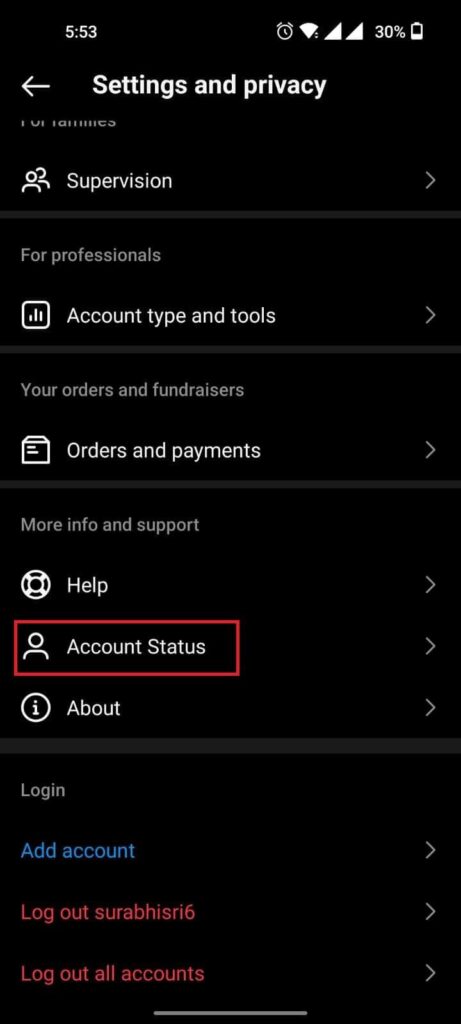
Step 3: Check your account status. This will show whether your account's content has been affected.
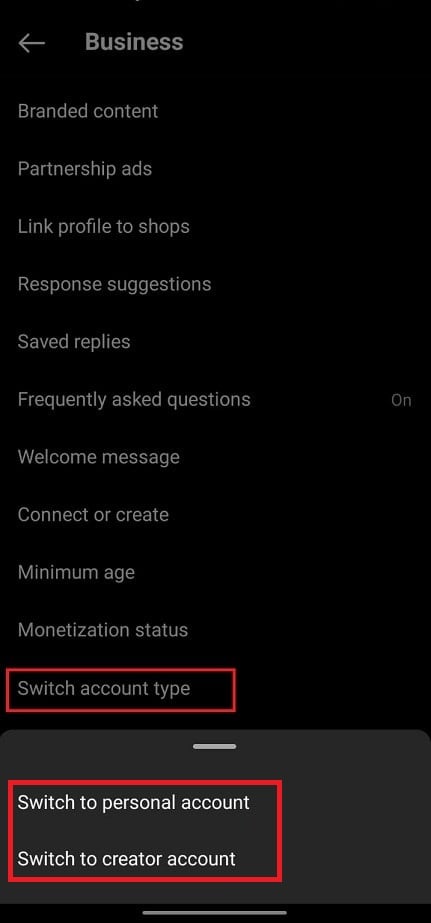
Method 2: Switch to a personal account or a creator account
By making this switch, you will gain access to more comprehensive insights and analytical tools, which will help you resolve issues related to Reel insights.
Step 1: Go to your Instagram profile and tap the hamburger icon. "Settings and Privacy" Select one.
Step 2: "Business Tools and Controls" Tap, "Switch account type" Select one.
Step 3: Finally, "Switch to personal account" or "Switch to Creator Account" Tap it.
Method 3: Clear and update your Instagram data.
If excessive data accumulates in the Instagram app over a long period, some features may stop working completely. Therefore, clearing the cache can help the app run smoothly.
The Insights option may disappear because you're using an older version. Therefore, you can update to the latest version from the Google Play Store or App Store.
Method 4: View Instagram Insights from your Facebook page
If your Instagram business account is linked to your Facebook page, you also have the option to access Insights directly from Facebook.
Step 1: Facebook Log in to your account and go to the page.
Step 2: Meta Business Suite Select from the top menu Instagram Select a page.
Step 3: Review the insights and view the analytical and performance data.
Method 5: Delete third-party apps
To resolve the issue of Instagram Reels views not being displayed, consider removing any third-party apps connected to your Instagram account. These apps can sometimes interfere with the proper functioning of Instagram's analytics tools.
Disconnecting or uninstalling third-party apps can help ensure there are no conflicts affecting the visibility of Reels Insights. After removing these apps, check if the Insights display as expected.
Method 6: View Insights on Instagram Web
To address the issue of Instagram Reels Insights not displaying, try accessing Insights directly on the Instagram web platform. Occasionally, due to technical issues or limitations, Insights may not display correctly in the mobile app.
Log in to your Instagram account on the web, access the relevant Reels, and then access your insights.
Method 7: Contact Instagram
If you're experiencing issues with Instagram Reels Insights not working despite trying various methods, you may need to contact Instagram Support directly.
You can contact Instagram through official support channels such as the Help Center, or report issues within the app.
By following these steps, you should be able to see the numbers in Instagram Reels Insights. Please share your thoughts in the comments section.