


When you tag someone on TikTok, you're inviting them to participate in your post. Mentioning people in your videos—whether video partners or someone in the comments section—allows you to reach a wider audience. This guide explores how to tag someone on TikTok and teaches you essential skills for connecting with others on this dynamic social media platform.
How to tag someone on TikTok
Tagging someone on TikTok is an easy way to give them credit, collaborate with them, and interact with them. Also, when you mention someone in your video, they receive a notification about being tagged. Whether you've already posted videos or plan to, this guide will explain this feature in detail.
Can I tag people on TikTok?
yes On TikTok, you can tag other people.

Method 1: Use a mobile app
If you want to mention someone in a TikTok post using the mobile app, you can try the following two methods:
1. Tag someone in the caption.
This is the most convenient way to tag someone in a TikTok video. Follow these steps to learn how to tag someone in a TikTok video using captions.
Step 1: Open the TikTok app on your device, Plus icon displayed at the bottom of the screen Tap it.

Step 2: Red button Tap to create a TikTok video, or use the upload option to upload a video you've filmed.

Step 3: Now, Checkmark icon Tap it.
Step 4: Next, the following will appear in the lower right corner of the screen Red "Next" button Tap it.
Step 5: Add a video description and hashtags, @mention option Tap it.

Step 6: In the search bar that appears in the mentions section, enter the name of the person you want to tag and select their profile.
Step 7: Finally, [Post] Tap the button.
In this way, someone gets tagged, and TikTok notifies them about that activity.
2. Tag someone using comments.
Mentioning someone in the comments section of a TikTok video is also considered tagging. Here's how to mention someone in the comments section:
Step 1: Open TikTok on your mobile device and click the top of the homepage. [Following] or [For You] Tap the tab.

Step 2: Find the video you want to tag the target person in, and it will appear in the upper right corner of the screen. Comment icon Tap it.
Step 3: The comments section will open. In the comment addition text box... @symbol Tap it.
Step 4: Now, the target Names of people Enter the information and tap the profile.
Step 5: Step 7: Finally, the following will appear in the lower right corner of the screen [send] Tap the button.
The people you tag will be notified that they were tagged in a particular video. Users who see your comments can click on the username link of the person they tagged to view their profile.
Method 2: Use the desktop
You can tag someone even when scrolling through TikTok on your desktop. Follow these steps to learn how to tag someone in your TikTok video.
Step 1: Use your browser to access TikTok Log in to your account Then, click the upload button in the upper right corner of the screen.

Step 2: [choice] Click the button to select a file.
Step 3: Once you have selected the video, enter the caption text in the caption text box. Click the @symbol I will.
Step 4: I want to add tags. Person Search Then, click on that profile.
Step 5: Finally, the following will appear in the lower right corner of the screen. [Post] Click here.
Congratulations, you tagged someone in your video. They will also share credit on the platform.
How to mention someone after posting on TikTok
Sometimes you might want to tag someone in your TikTok video, but you can't. This could be because the person isn't on your viewer list. In such cases, they won't see the content you post. However, if you still want to tag them in your content, you can follow these steps.
Step 1: Launch the TikTok app and the following will appear on the right side of the screen Three-dot icon Tap it.
Step 2: From this list, tap Privacy settings, then tap Who can watch this video.
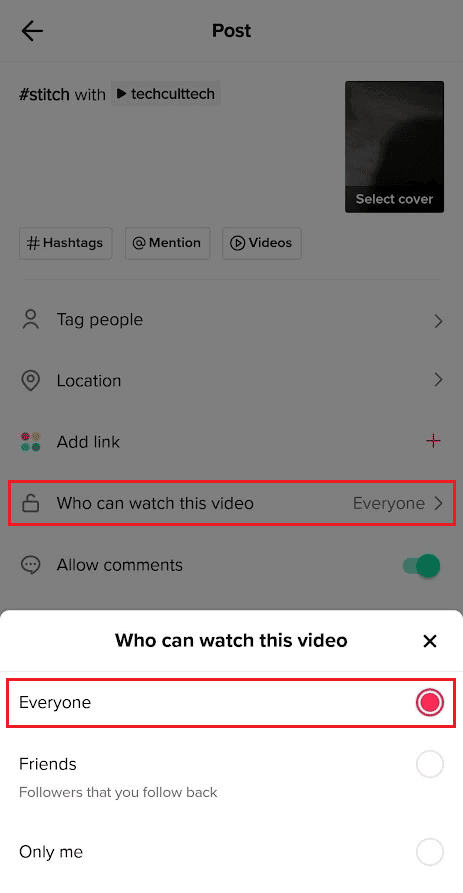
Step 3: In the pop-up tab, the audience 「Everyone」 I will change it to this.
Step 4: Again, Three-dot icon Tap to edit the tagged people.
Step 5: A list will open, from which you can select the person you want to add. Finally, [completion] Tap it.
Tagging someone on TikTok is a simple yet powerful way to improve the reach and engagement of your content. Even after posting, you can access video editing options to... You can tag someone on TikTok. Use this feature to connect with other users and increase your presence on TikTok. If you'd like to learn more, please ask your questions in the comments below.