


An ideal voice changer for PC is a tool that allows you to easily alter your voice. It can be used for a variety of purposes, such as voice chat during games, video production, and marketing. However, with countless voice changers on the market, many people may be unsure which one to choose.
This article features a selection of the best voice changers for 2025. After reading this, you're sure to find the perfect tool for you.
The ultimate voice changer for PC
TopMediai Voice Changer
TopMediai Voice Changer This is a PC voice changer that allows you to alter your voice in real time. It's useful for a variety of applications, including online games, streaming platforms, and creating narrations for videos. With a simple and sophisticated UI, it's easy for even beginners to use.
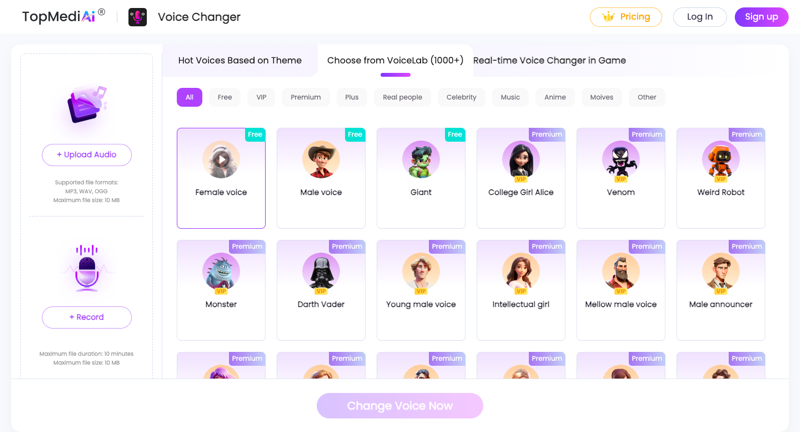
Supported platforms:
- Streamlabs OBS
- Elgato Stream Deck
- TikTok Live Studio
- Twitch
- Omegle
- Gamecaster, etc.
TopMediai Voice Changer Features:
- Equipped with a variety of voice effects
- Real-time voice change support
- Voice customization and adjustment are possible.
- It also features an AI-powered music generation function.
How to use TopMediai Voice Changer:
Step 1: Select an input/output device
Open "Settings" and select the microphone and speaker you want to use.

Step 2: Select a voice effect
Select your preferred effect from the list and apply it.
Step 3: Adjust global settings
Enable "Voice Changer" and "Listen to My Voice," then speak into the microphone to check your voice. If you notice noise, click the "Speaker icon" to enable noise reduction. However, be careful not to set the noise reduction level too high, as this may cause the sound to cut out.
Step 4: Customize your voice settings
Click on the character icon to fine-tune the voice settings to your liking.
9 Recommended PC Voice Changers Other Than TopMediai Voice Changer
Clownfish Voice Changer
A simple, free voice changer. Compatible with platforms like Discord and Steam, it easily creates robot and alien-like voices.

merit:
- Text-to-speech function included
- Built-in music player
- VST plugin compatible
Disadvantages:
- There are relatively few types of voice effects.
- The UI is a little too simple.
MorphVox
The free version offers three preset voices (male, female, and child). Upgrading to the paid version unlocks even more diverse effects.

merit:
- Free version available
- Real-time voice change support
- Customizable
Disadvantages:
- The free version has a limited number of effects.
- Advanced features are paid.
AV Voice Changer
A tool that utilizes virtual audio driver technology to drastically alter the quality of your voice.

merit:
- A variety of voice effects
- Advanced audio editing features
- Compatible with many chat apps
Disadvantages:
All-in-one video converter
Download videos with one click from YouTube, Facebook, Twitter, Instagram, NicoNico, TikTok, Reddit, Netflix, and other video sites. Lossless music converter compatible with Apple Music, Spotify, YouTube Music, SoundCloud, and more. Try it now!
- High learning curve
- Free trial available, but it's paid software.
Voxal Voice Changer
Even the free version lets you enjoy robot and alien-like voices. It has high compatibility with Valorant and Discord.

merit:
- Abundant voice effects
- Lightweight and low load
- Supports processing of recorded audio.
Disadvantages:
- The free version includes ads.
- Advanced features are subscription-only.
MasqVox Voice Changer
A real-time voice changer specifically designed for Skype.

merit:
- Lightweight and smooth operation
- Intuitive interface
Disadvantages:
- Low level of customization
- The UI is a bit outdated.
SuperVoiceChanger
A tool that lets you easily change your voice with one click. Compatible with WhatsApp, LINE, and more.

merit:
- Automatically adjusts the sound to the optimal level.
- Easy to use, no setup required.
Disadvantages:
- Low level of customization
- There are relatively few types of effects.
VoiceMeeter
A professional-grade audio mixer. It allows for the creation of custom effects, but is more suitable for advanced users.

merit:
- Free and feature-rich
- Advanced audio control
Disadvantages:
- It's difficult for beginners.
- Technical knowledge is required for setup.
Adobe Audition
A professional-grade audio editing tool. Includes a voice changer function.

merit:
- High degree of freedom in audio editing
- With pitch correction function
Disadvantages:
- Subscription system
- Somewhat difficult for beginners
All-in-One Voice Changer
A voice changer for Skype and Yahoo Messenger.

merit:
- Simple pitch adjustment function
- For prank calls and voice modulation.
Disadvantages:
- No advanced features
- The UI is outdated.
summary
This time, we introduced 10 free voice changers for PCs that will be available in 2025. Each tool has its own advantages and disadvantages, so it's important to choose one that suits your needs.
especially, TopMediai Voice Changer This is an excellent voice changer that combines ease of use with advanced customization options. If you want to enjoy voice changing for gaming, streaming, or video production, you should definitely give it a try!





