


Snapchat's Snap Map feature shows your current physical location to people you choose to share this information with. If you have the Snapchat app open and Ghost Mode is turned on, your friends and family will see your BitMoji "customizable animated avatar" at your current location on Snapchat Map.
You may have noticed other people's BitMojis driving miniature cars, flying miniature airplanes, or listening to music with headphones. If you're wondering how to listen to music or do other fun things with your BitMoji, this article will show you how.
How to play music for BitMoji on Snapchat
It's surprisingly easy to get BitMoji to listen to music.
Simply open the Snapchat app and play music on your phone. BitMoji will put on headphones and immediately start jamming to a good song amidst flying musical notes. It doesn't matter which app you use to play music, as long as Snapchat is open. As soon as the music stops, the headphones disappear and BitMoji returns to normal.
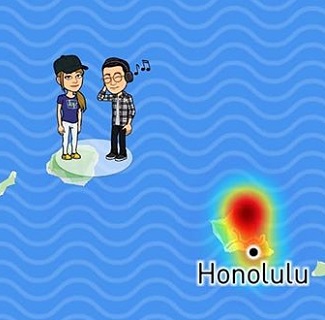
However, there is no way to make BitMoji run this animation permanently. You can also edit the BitMoji mood to your liking in Snapchat.
There is another way to get BitMoji to listen to music.
In this animation, Bitmoji doesn't wear headphones. However, musical notes fly around his head, and Bitmoji dances.
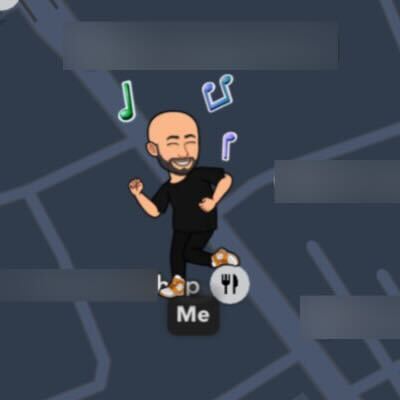
This is something that inevitably happens when you attend concerts or music festivals. The SnapMap feature regularly updates a list of concerts, festivals, and other local events, marking each venue on the map.
When you're at one of these venues, not only will BitMoji be dancing, but your friends will also be in a bubble next to BitMoji, so you can see exactly the concert you're attending.
Other cool things you can do with BitMoji on Snapchat
As mentioned earlier, there are many other fun things you can do with BitMoji on Snapchat. For example, if it's your birthday, BitMoji will receive balloons and a matching birthday hat all day long. Of course, to do this, you first need to set your birthday in your Snapchat settings.
But that's not all. Let's look at five other fun things you can do with BitMoji.
To board an airplane: When you open Snapchat at the airport, BitMoji will board a plane and fly to your destination.

Take a break during your trip: If you stand near the airport, a BitMoji with luggage on its back will appear on Snapchat.
Get in a car: If you drive with the Snapchat app open, you can see Bitmoji driving a car on SnapMap.

Take BitMoji to the beach: When you go to the beach and open the Snapchat app, Bitmoji will be building sandcastles and putting towels on their shoulders.
Playing golf: Visit a golf course with Snapchat open and play golf with BitMoji.

These BitMoji animations are a fun and unique way to share updates with your friends. Give them a try! These are just a few examples of what you can do with BitMoji in SnapMap; there's so much more!
How to protect your privacy on Snapchat
Playing with BitMoji is definitely fun, but you should also consider the minor privacy issues. This feature allows your friends to see where you are, what you're doing, and when you were last active on Snapchat.
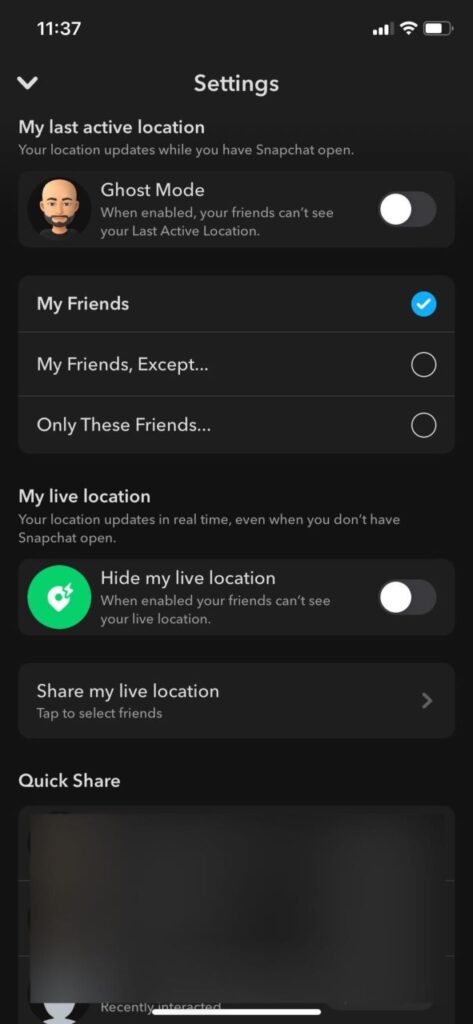
Fortunately, if you don't want others to know where you are or what you're doing, you can customize your privacy settings on Snapchat. There are three ways to do this.
1. From the settings screen, select the users who can see your location on the Snap Map. "friend" If you want to hide your location from the selected person: "Anyone other than friends..." If you want to carefully select which friends can track your location "Only these friends" Select one.
2. Ghost Mode Toggle Use this to hide yourself from all Snapchat users. "My spot at the live show" In the section, Hide your live performance location. Turn the toggle on.
3. You can also use third-party tools to spoof your location on the SnapMap.
If you're hesitant to share your location with your Snapchat friends, you can follow the steps above to hide your activity while using the app and protect your privacy.
Update your status on Snapchat
It's fun to share your current activities with Snapchat's BitMoji update. Use this guide to change your BitMoji status and show your current activities. You can use this feature to share almost anything, whether you're listening to music, on a plane, or driving your car.
However, if you are concerned about your privacy, consider turning on Ghost Mode in Snapchat to hide yourself on Snapmap.
Have you noticed any other interesting things BitMoji is doing? Do any of your fellow Snapchat users have any cool BitMoji tips?
FAQ
Q. How can I make it show on Snapchat that I'm listening to music?
A. The process of letting BitMoji listen to music on Snapchat is very simple. Just connect your earphones/headphones and play music on your phone while the Snapchat app is open. You can also play music through your phone's speaker.
BitMoji instantly turns on headphones, and musical notes start flying around. As long as Snapchat is open, it doesn't matter which app you use to play music.
Q. Why can't I hear music in my Snapchat Stories?
A. If you can't add music to your Snapchat Story, or if you can't hear music in someone else's Snapchat Story, it's because the music isn't available in your country.
Q. How can I hide bit characters in SnapMap?
A. The Ghost Mode feature makes it easy to hide your location on Snap Maps. To enable this feature, go to the Maps section of Snapchat > Settings (gear icon) > Ghost Mode.