

I want to enable dark mode in Snapchat, but I don't know how. Do I need to pay to use dark mode in the Snapchat Android app? Snapchat's dark mode feature was easily available to iPhone users, but Android users had to subscribe to Snapchat+ to use it. Thankfully, this is no longer the case, and you can enable dark mode in Snapchat for free, whether you're using an iPhone or Android.
How to enable Snapchat Dark Mode in 4 easy steps
Enabling dark mode in Snapchat is easy. It's not as complicated as turning off the camera shutter sound while using Snapchat. Especially on Android, make sure you're using the latest version of the app.
1. Launch Snapchat, BitMoji Tap to go to your profile.
2. upper right corner Gear icon Tap to go to settings.
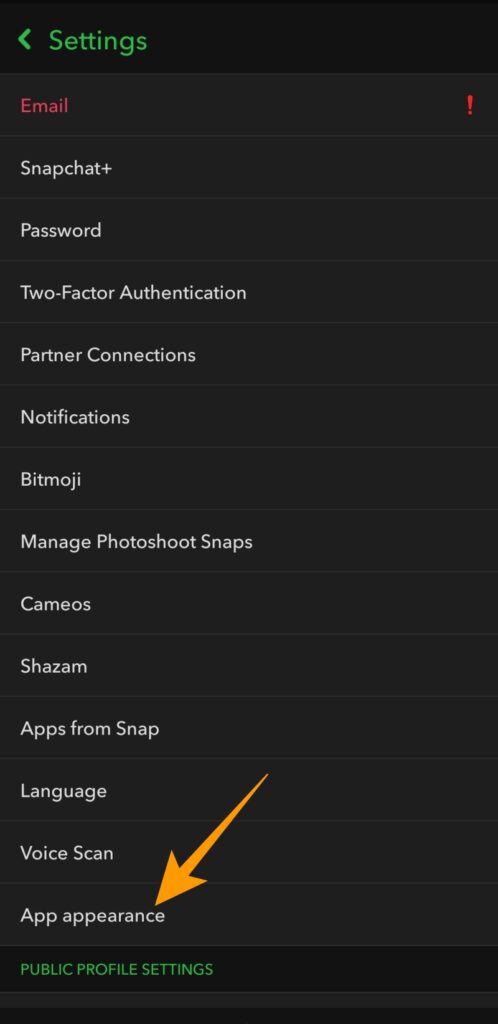
3. "Settings" Scroll down to this point. "App appearance" Find and open it.
4. "App Appearance" in, "Always dark" Tap the option to enable dark mode.
5. Android users will see a pop-up prompting them to restart the app. Restart now Tapping this will restart the app in dark theme.
How to link Snapchat's dark mode to your iPhone's dark theme
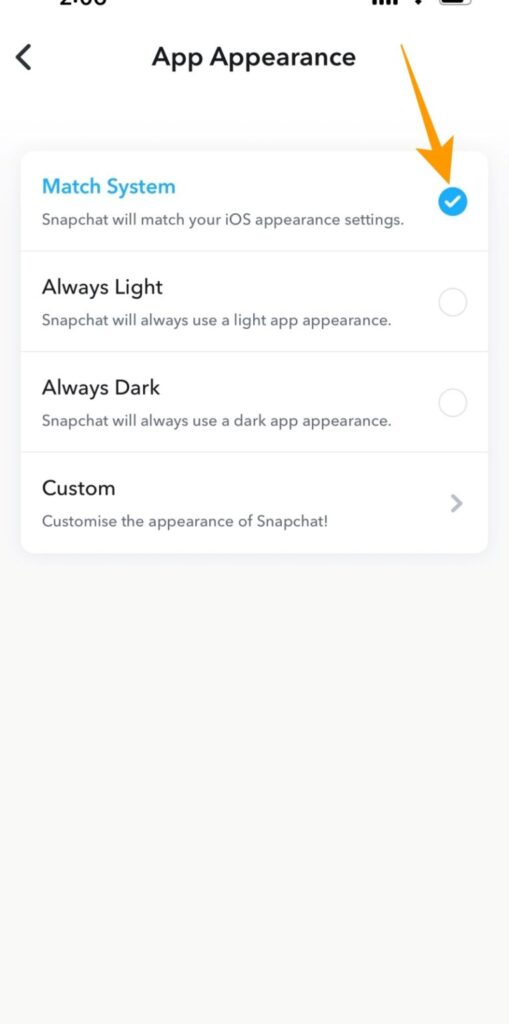
Unlike the Android app, the iOS app offers four options for the app's appearance. From these options, "System-compatible" By selecting this option, you can link Snapchat's dark mode to your system's appearance settings.
Therefore, if you have scheduled dark mode for a specific period in the Settings app, "System-compatible" When you select the option, Snapchat will automatically switch to dark mode for that period. Here's how to link dark mode to your iOS appearance settings:
1. Snapchat App appearance options To find it, follow steps 1 through 3 in the section above.
2. App appearance in, Matching System Tap to link Snapchat's dark mode to your iPhone's appearance settings.
Snapchat looks beautiful in dark mode.
Snapchat excels over other social media apps with its engaging video snaps and filters. If you use the service for extended periods, turning on dark mode can prevent unnecessary eye strain. However, dark mode isn't the only feature Snapchat offers to enhance the user experience.
FAQ
Q: Has Snapchat removed its dark mode?
A: Snapchat hasn't removed Dark Mode, but it's now available for free to all Snapchat Android users. Android users no longer need to pay for Snapchat's subscription service called Snapchat+ to use the Dark Mode feature.
Q: Does Snapchat have a dark mode for Android?
A: Yes, Snapchat has a dark mode feature for Android. This feature was previously limited to Snapchat+ users.
Q: Where are the appearance options for the Snapchat app?
A: To find the App Appearance option in Snapchat, open your Snapchat profile and go to Settings. Once in Settings, find the App Appearance option under Settings.