


One of the many dilemmas when taking snapshots is whether to use your phone's front or rear camera. Fortunately, Snapchat offers the flexibility to use both cameras in a single snapshot. Combined with Snapchat's excellent lenses and features, this allows you to capture videos from new perspectives.
So, how do you access the Snapchat dual camera feature on your mobile phone?
What is a Snapchat dual camera?
Introduced in 2022, Snapchat's Dual Camera feature is a fantastic way to use both your front and rear cameras simultaneously when taking snaps. This allows you to add creativity to your posts and let others enjoy the Snapchat Lens. The Dual Camera feature currently offers four layouts: Vertical, Horizontal, Cutout, and Picture-in-Picture.
Is Snapchat's dual camera feature available to everyone?
This feature is available worldwide to Snapchat users using iPhone XS/XR or later. Unfortunately, Snapchat's dual camera is not available on Android. While this feature has been available on iPhones for over a year, Snapchat's dark mode was initially limited to iPhones before eventually being introduced to Android as well. Therefore, the dual camera should be introduced to the Snapchat Android app sooner or later.
How to use Snapchat's dual camera
Snapchat's dual-camera feature is easy to use on your iPhone. Here's how to use it:
1.Snapchat Open it and go to the camera screen.
2. Camera toolbar Dual camera Alternatively, tap the flip camera icon.
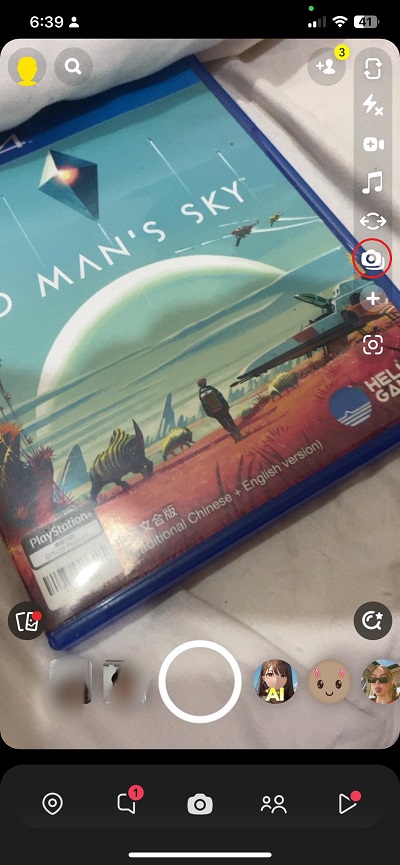
3. Select a layout and start recording or shooting a video.
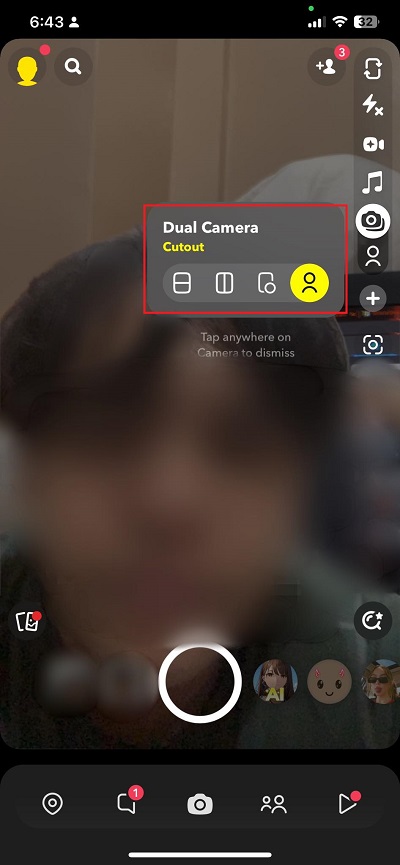
To use filters with a dual camera, tap one of the lenses below, just as you would when using a normal single camera setting in Snapchat.
Twice the camera, twice the fun!
Snapchat may have been a little late in releasing its own dual-camera feature, but it's great that users can finally use both cameras in a single snap. This feature has really expanded what you can do with Snapchat and its lenses.
FAQ
Q: Which devices are compatible with Snapchat Dual Camera?
A: Currently, the Snapchat dual camera feature is available on iPhone X/XS and later. There is currently no way to use the Snapchat dual camera on Android.
Q: Can I use lenses with Snapchat's dual camera?
A: Yes, it can be used. The lenses apply to both the front and rear cameras, where applicable. However, some lenses require the entire screen, so they may not work well with other dual cameras. On the other hand, using this feature will reduce the screen size.
Q: Why isn't my Snapchat dual camera working?
A: There might be a problem with the app. First, try force quitting and restarting the app. If the problem persists, try reinstalling Snapchat and see if that makes a difference. Also, make sure your Snapchat app is up to date.