With so many streaming services available, it's a good idea to compare them before choosing a subscription. Fortunately, most services offer free trials, so you can try them out without committing to a paid subscription. Netflix is a giant in the streaming video industry, with a wide selection of movies, TV shows, documentaries, anime, and its own original content. Often, it's the first choice for many people.
Will Netflix offer a free trial in 2024? How long is it? How can I use Netflix for free? Also, Netflix How to get it cheaper Are there any others? Find all the answers here.
1. Does Netflix offer a free trial? If so, how long is it?
Netflix no longer offers free trials. Previously, Netflix offered a 30-day trial, but this was discontinued in the US in October 2020. Netflix also ended its free plan in other locations, including Kenya, on November 1, 2023. Membership automatically terminates after the free period ends unless the user cancels. To continue watching, users must opt for a paid plan.
How much will Netflix cost in 2024?
Netflix has three subscription tiers, ranging from $6.99 per month for the cheapest to $22.99 per month for the most expensive.

2. Four ways to use Netflix for free in 2024
While Netflix's free trial is currently unavailable, you can still use Netflix for free. Here are four ways to experience Netflix's features and watch content for free. Don't miss out if you're on a budget or want to save money on entertainment.
Method 1: Get Netflix for free with T-Mobile
Major US insurance companies typically offer various benefits and perks to their customers as part of their service plans. If you live in the US and have a T-Mobile network, you may be able to get free Netflix. While it's called Netflix in the US, it's not available to all T-Mobile customers.
Who can get it: To get Netflix on the US, you need two or more Go5G™ or Magenta® plans, or at least one Go5G Next, Go5G Plus™, or Magenta® MAX plan.
Which Netflix subscription can you get? Initially, Netflix offered a basic plan. However, according to a recent update, as of January 24, 2024, T-Mobile packages will include an ad-supported Standard plan instead of the previous ad-free Basic option. This means you can still stream Netflix for free, but the stream will be ad-supported.
How do I activate T-Mobile Netflix?
If you are eligible to enjoy Netflix On Us programs, you can obtain and activate them by following these steps.
Step 1: Open the T-Mobile app and log in to your My T-Mobile account.
Step 2: Select "Accounts," and then select "Add-ons" next to the row of the primary account owner.
Step 3: Select "Manage Data & Add-ons," then select "Services," and then select the Netflix add-on you want.

Step 4: Review the options and click "Go to Netflix".

Step 5: You will be asked to enter your Netflix email address and password.
Step 6: Once you've entered your information, simply click "Agree and Start Watching."
Method 2: Stream Netflix for free with StreamFest
Netflix launched StreamFest just days after its 30-day free trial period ended in the US. The event is similar to promotional programs by premium television channels like HBO and Showtime. For example, Comcast Xfinity cable TV subscribers can try Showtime programming for free for 48 hours in August. Similarly, Netflix offers 48 hours of free streaming over the weekend to attract users.
StreamFest is now available in India, allowing anyone in India to stream Netflix content for free on weekends.

This offer is not available all year round. Please note that this offer is only valid during specific promotional periods. To get the latest information, Netflix.com/StreamFest You can visit [website address] and sign up for a reminder using your email or phone number. This way, you'll be notified as soon as StreamFest goes live.
Method 3: Get the Verizon Netflix + Max bundle
Verizon offers myPlan customers a $10/month streaming bundle of Netflix and Max. It's not entirely free, however. The cheapest Max plan includes ads and costs $9.99/month. If you want to subscribe to Max, choosing this bundle will give you Netflix for free. In particular, the bundle's benefits also include Apple TV+, +play points which can save you more streaming and content, Walmart+, TravelPass, and more.
Who can get it? This applies to Verizon mobile users with an Unlimited Welcome, Unlimited Plus, or Unlimited Ultimate plan.
You can visit the Verizon website and add and activate Netflix and Max (with ads) benefits in myPlan.

Method 4: Get an account from a friend or family member
A fourth way to watch Netflix for free is to share your account with friends and family. Netflix allows you to create up to five profiles on one account, making sharing easy. If you have friends who don't use Netflix, ask another friend.
Netflix will be launching in 2023. Crackdown on password sharing As a result, we will be charging more for users sharing their accounts. Users who do not live together cannot share a Netflix account. The platform uses information such as IP address, device ID, and account activity to determine whether the device logging into the account is connected to the primary location.
All-in-one video converter
Download videos with one click from YouTube, Facebook, Twitter, Instagram, NicoNico, TikTok, Reddit, Netflix, and other video sites. Lossless music converter compatible with Apple Music, Spotify, YouTube Music, SoundCloud, and more. Try it now!
If you want to share your account with someone outside your family, you will need to pay an additional monthly fee of 7.99, and only Standard and Premium users can add member slots.
If you don't want to pay extra, Log in to your account using your friend's Wi-Fi. It is necessary.

3. Three ways to get Netflix cheaply
Netflix's free service is great, but it's not for everyone because there are many conditions to meet. Here are three ways to use Netflix at a relatively low price even if you don't qualify.
Method 1: Find a Netflix promotional code
There are several promotional codes to help you reduce the cost of your Netflix plan. Many coupon code sites randomly offer discounts on streaming services, electronics, clothing, groceries, and more. Simply search for "Netflix Promo Code" and you'll get many results. Here are five popular coupon code sites for you to try:
- CNN Coupons
- RetailMeNot
- USA TODAY Coupons
- Groupon
- Wethrift
Method 2: Use a Netflix gift card
Occasionally, retailers and online platforms offer Netflix gift cards at a discounted price. These opportunities are rare and tend to end quickly, but they can offer a direct way to save several months of service. Netflix gift cards can usually be found here.
Retail store: Many physical stores carry Netflix gift cards. Availability may vary depending on your location, but you can generally check at the following places:
- supermarket
- Consumer electronics retailer
- convenience store
- Department store
- pharmacy
In the US, stores like Walmart, Target, Best Buy, and Walgreens often have them in stock. If you live outside the US, checking large retail chains and electronics stores is a good idea.
Online retailers: Netflix gift cards can also be purchased online from various retailers, such as the following:
- Amazon
- Best Buy (online store)
- Target (online store)
- Walmart (online store)
Netflix Website: In some regions, you can purchase Netflix gift cards directly from the Netflix website. This option may redirect you to an authorized third-party vendor to complete your purchase.
Digital gift card platform: There are several websites that specialize in selling digital gift cards, such as Netflix gift cards. For example, consider the following:
- eGifts
- GiftCards.com
- PayPal Gifts
Banking Rewards Program: Some banks and credit card companies offer rewards programs that allow you to redeem points for a variety of items, such as Netflix gift cards. Check with your bank or credit card provider to see if this is an option for you.
Method 3: Convert Netflix downloads to MP4 - save them permanently!!
To save money on Netflix, in addition to using promotional codes and gift cards, Save your favorite movies and shows in MP4 format, then cancel your subscription. This method allows you to save your favorite titles to your device and watch them anytime. For this purpose, Video Converter is an excellent choice. It is powerful software that allows you to download any Netflix content for offline viewing. Video Converter is compatible with both Windows and Mac computers. You can permanently save Netflix videos to your device.
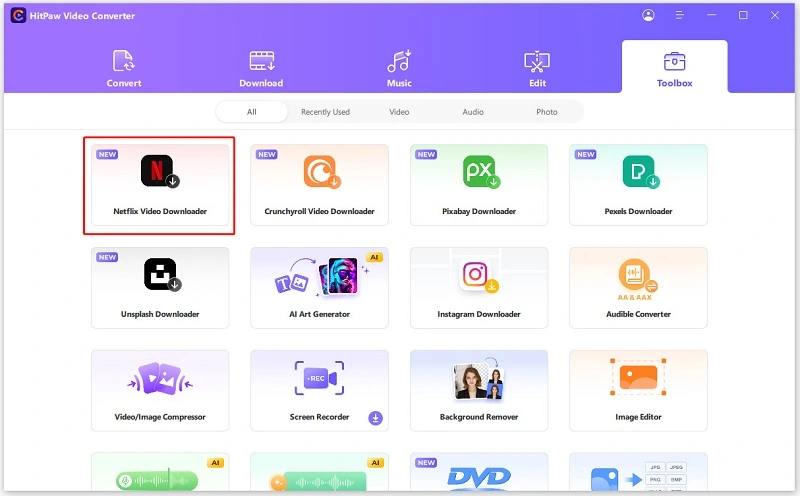
Step 1: Download and install Video Converter on your computer. After installation, launch it and find Netflix Video Downloader in the "Toolbox" tab. Click to open it.
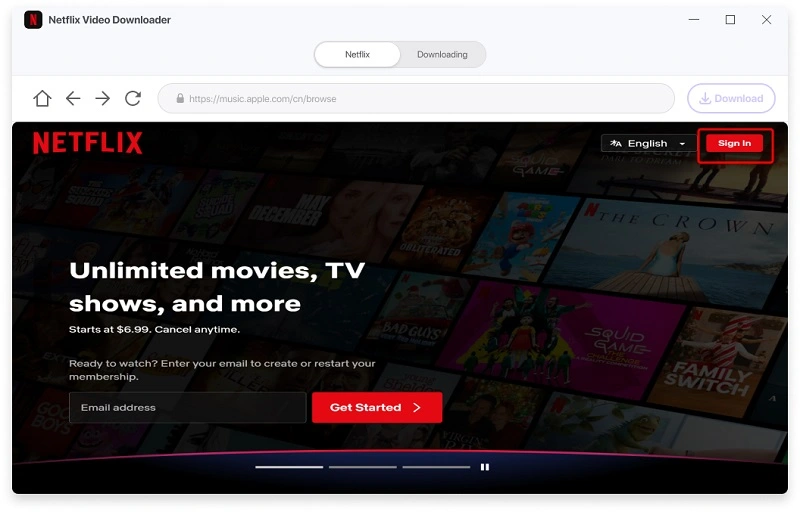
Step 2: Sign in to your Netflix account and prepare to download.
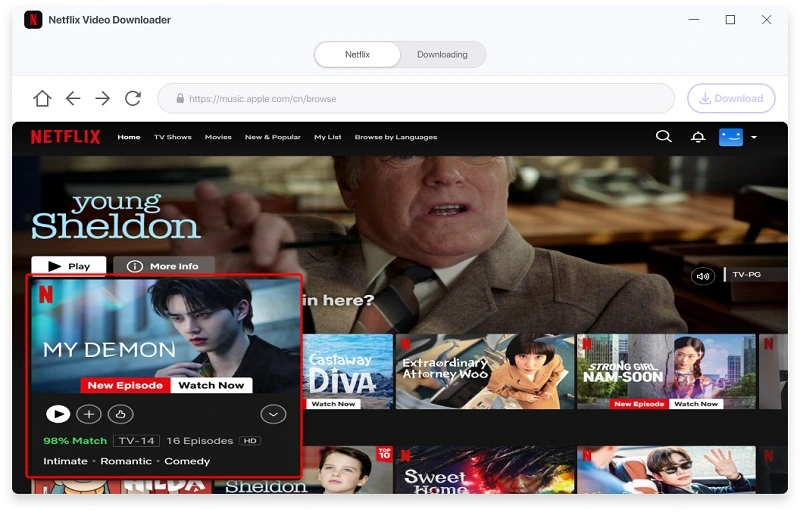
Step 3: Search for your favorite TV shows and movies on Netflix. After making your selection, click the "Download" button.
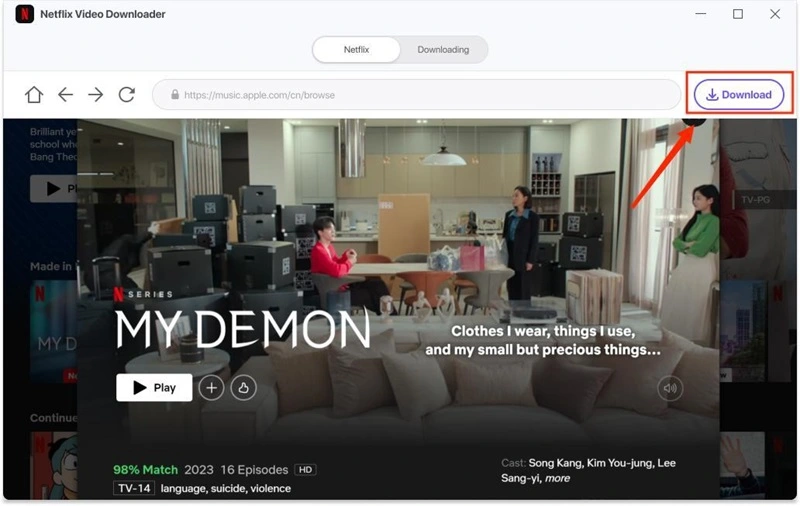
Step 4: Then, press the "Download" button. You can customize the download by selecting the video file, resolution, audio, and subtitles to suit your needs. After making your settings, click the "Download" button to start the download.
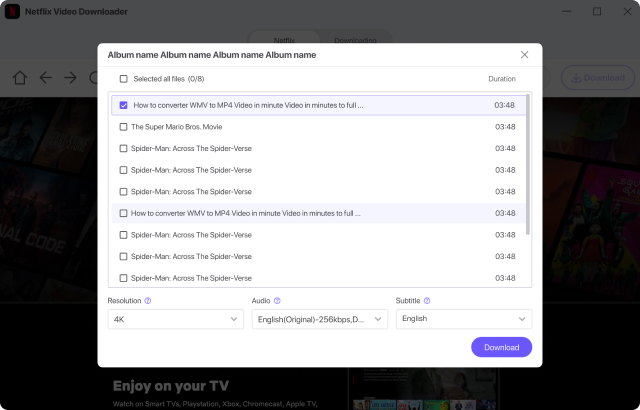
Step 5: Once the download task is complete, the downloaded Netflix episodes will be saved to the "Destination" folder.
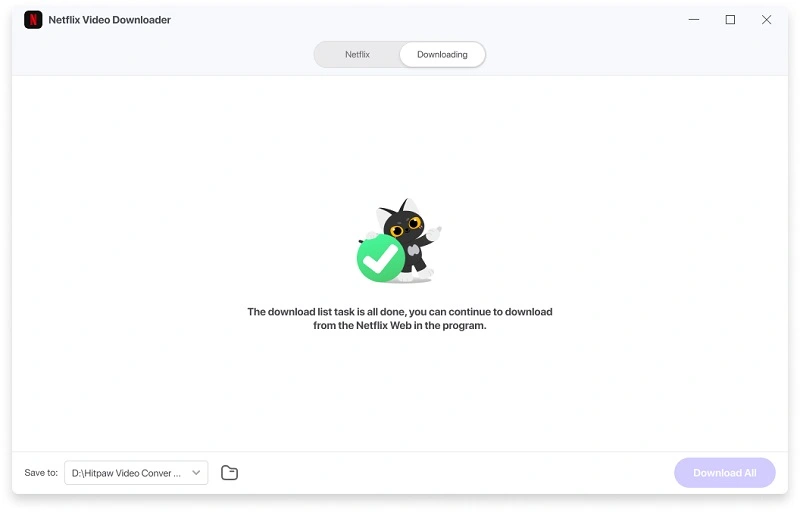
Simply click the download button to download your favorite movies and TV shows to your PC and save them in MP4 format.
Last words:
In summary, while Netflix no longer offers a free trial, you can still watch Netflix for free or at a low cost. We've discussed four ways to watch Netflix for free and three tips for reducing the cost. Furthermore, if you want to keep your Netflix downloads to watch later without a subscription, Video Converter is an excellent solution. You can save videos in MP4 format and watch them anytime.